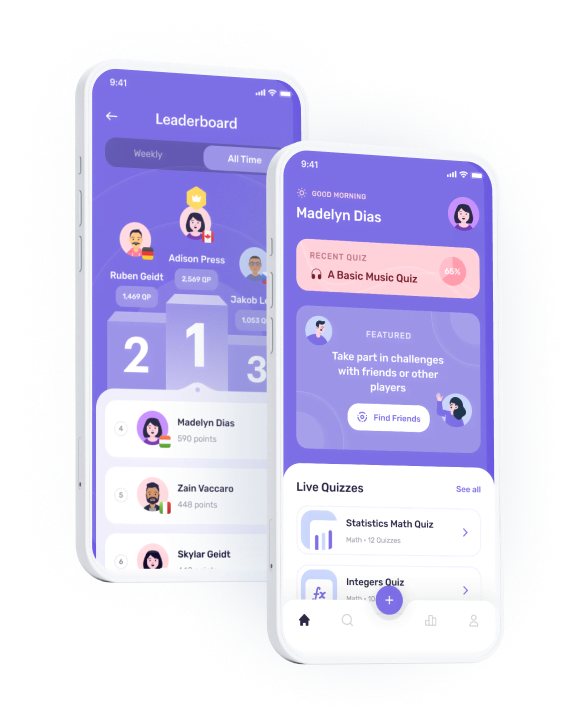
Queezy is a Mobile App that will be using for Quiz, Trivia, Game, and Education products or services
Queezy - Quiz App UI Kit
Queezy App UI Kit will help your Quiz, Trivia, and Education products or services. Came with unique style and niche, you can easily edit and customize all elements with design component which can speed up your design process.
Suitable for :
This set will be very useful for Designers, Developers, Startups and Design Agencies to speed up the design process.
You can read the Offline Documentation on the downloaded zip file in documentation folder.

Setting Up Project on Flutter
1. Android Studio/VS Code: To customised this project you should have Flutter and Dart installed and configured effectively on your gadget Install Flutter Set up your editor Install the Flutter and Dart Plugins.
2. Unzip the flies folder and open it. There have source code name as quezzy, then use your preferred IDE (Android Studio / Visual Code) to open the project.
3. Check your flutter version to run this project, you can check the requirement version on pubspec.yaml, then you can run flutter pub get command on terminal.
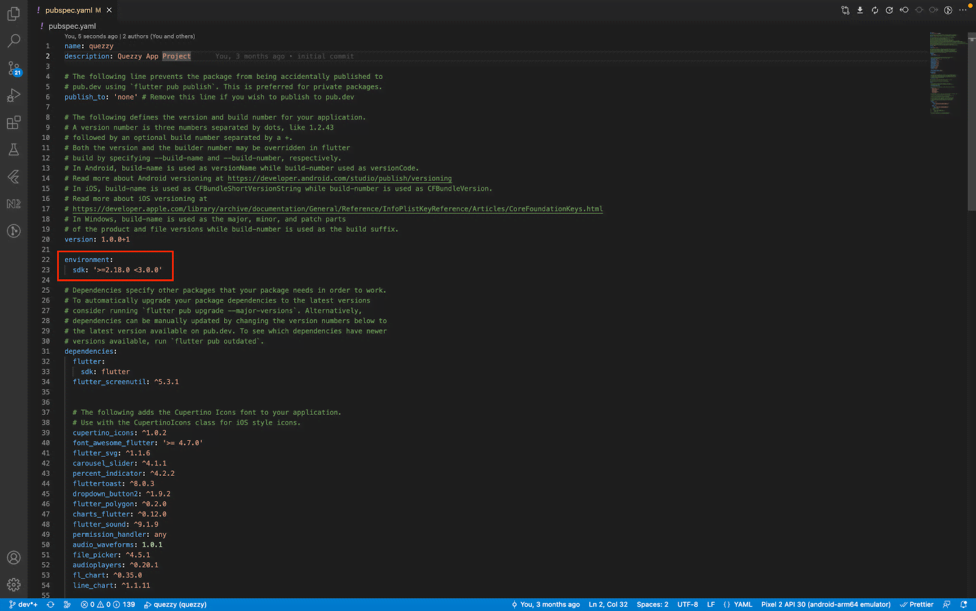

4. Now click run button to see if it’s works
Typography
Rubik
Abcdefghijklmnopqrstuvwxyz
0123456789
&!?%*@
Name
Size
Line Height
Font Weight
Name
Heading 1
Size
32px
Line Height
48px
Font Weight
Bold
Name
Heading 2
Size
28px
Line Height
42px
Font Weight
Bold
Name
Heading 3
Size
24px
Line Height
36px
Font Weight
Medium
Name
Body XLarge
Size
20px
Line Height
28px
Font Weight
Medium
Name
Body Large
Size
18px
Line Height
24px
Font Weight
Medium
Name
Body Large
Size
18px
Line Height
24px
Font Weight
Regular
Name
Body Normal
Size
16px
Line Height
24px
Font Weight
Bold
Name
Body Normal
Size
16px
Line Height
24px
Font Weight
Medium
Name
Body Normal
Size
16px
Line Height
24px
Font Weight
Regular
Name
Body Small
Size
14px
Line Height
20px
Font Weight
Bold
Name
Body Small
Size
14px
Line Height
20px
Font Weight
Medium
Name
Body Small
Size
14px
Line Height
20px
Font Weight
Regular
Name
Body XSmall
Size
12px
Line Height
18px
Font Weight
Medium
Name
Body XSmall
Size
12px
Line Height
18px
Font Weight
Regular
Name
Text Small
Size
14px
Line Height
20px
Font Weight
Medium
Name
Text XSmall
Size
12px
Line Height
18px
Font Weight
Medium
Color Style
Primary & Secondary Color Palette
Royal Blue
HEX#6A5AE0
RGB206 90 224
HSL247 68 62
Dull Lavender
HEX#9087E5
RGB144 135 229
HSL246 64 71
Pink Salmon
HEX#FF8FA2
RGB255 143 162
HSL350 100 78
Accent Color Palette
Pastel Pink
HEX#FFD6DD
RGB255 214 221
HSL349 100 92
Hawkes Blue
HEX#C4D0FB
RGB196 208 251
HSL227 87 88
Mint Tulip
HEX#C9F2E9
RGB12 9 42
HSL167 61 87
Greyscale Color Palette
Black
HEX#49465F
RGB12 9 42
HSL245 65 10
Grey 1
HEX#49465F
RGB73 70 95
HSL247 15 32
Grey 2
HEX#858494
RGB133 132 148
HSL244 7 55
Grey 3
HEX#CCCCCC
RGB204 204 204
HSL0 0 80
Grey 4
HEX#E6E6E6
RGB230 230 230
HSL0 0 90
Grey 5
HEX#EFEEFC
RGB239 238 252
HSL247 68 96
White
HEX#FFFFFF
RGB255 255 255
HSL0 0 100
Step Running Project
1. Before run the project, make sure your android or ios device are connected to the IDE (Visual Studio / Android Studio)
2. After make sure the device are connected, run command flutter pub get to get all dependency
3. Choose device to run this project, then click button run or run command ‘flutter run’
Step Renaming Folder
This is the step on how to renaming folder on Flutter:
1. Renaming class name use Pascal Case pattern

2. If you want to rename the folder please following the pettern of existing folder, now the pattern is snake case.

Step Renaming Package
To rename package name in flutter, you can use this change_app_package_name Library. If we use this library we can Change App Package Name with single command. It makes the process very easy and fast.
What this Library Does?
This is the steps on how to use this library to rename package on flutter:
1. Add Change App Package Name to your pubspec.yaml in dev_dependencies: section.
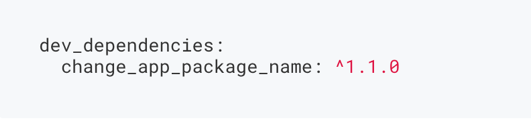
2. Not migrated to null safety yet? use old version like this
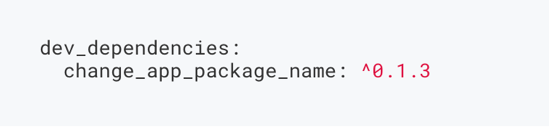
3. Update dependencies
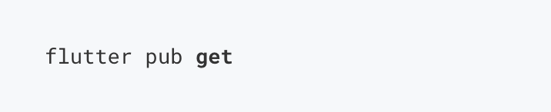
4. Run this command to change the package name.

Where com.new.package.name is the new package name that you want for your app. replace it with any name you want. You can see the full documentation about the library here.
Changing Logo
To change logo in flutter, you can use this Flutter Launcher Icons Library. Flutter Launcher Icons Library is a command-line tool which simplifies the task of updating the Flutter app's launcher icon.
This is the steps on how to use this library to changing logo on flutter:
1. Setup the config file
Add your Flutter Launcher Icons configuration to your pubspec.yaml or create a new config file called flutter_launcher_icons.yaml. An example is shown below. More complex examples can be found in the example projects.
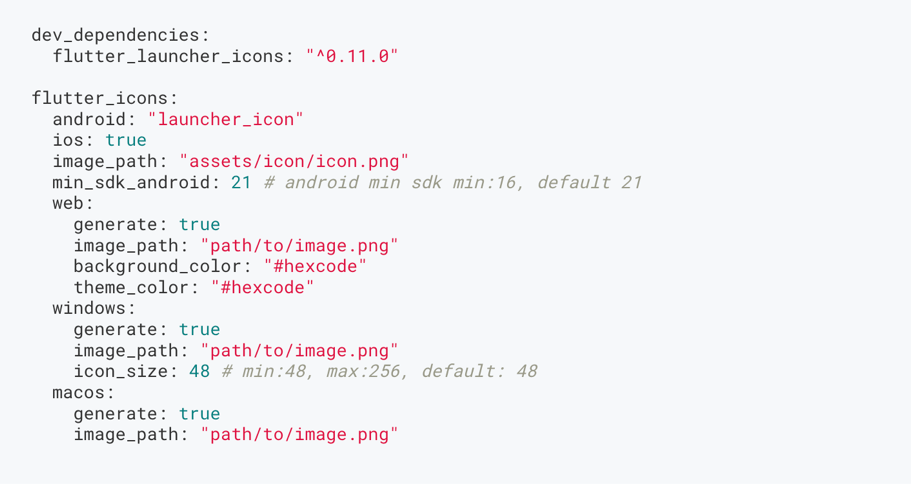
If you name your configuration file something other than flutter_launcher_icons.yaml or pubspec.yaml you will need to specify the name of the file when running the package.

Note: If you are not using the existing pubspec.yaml ensure that your config file is located in the same directory as it.
4. Run the package
After setting up the configuration, all that is left to do is run the package.

If you encounter any issues please report them here.
In the above configuration, the package is setup to replace the existing launcher icons in both the Android and iOS project with the icon located in the image path specified above and given the name "launcher_icon" in the Android project and "Example-Icon" in the iOS project.
You can see the full documentation about the library here.